As we approach the end of 2026, research integrity remains a critical focus for the scholarly publishing ecosystem: fast technological advancements are constantly pushing the boundaries of integrity, impacting how everyone in this space interacts with the scholarly record.
Crossref members register around 37,000 records daily. All this metadata is openly shared with the global scholarly community through our free APIs. We receive over two billion calls to our API each month, signalling its use by hundreds of tools and services worldwide, supporting the discovery and assessment of scholarly metadata. As part of a new series in our blog, we will spotlight the diversity of tools and integrations that rely on Crossref metadata to serve the scholarly community. In this initial post, we chat to Luca Foppiano, the developer and maintainer of Grobid1, to learn about how Grobid uses Crossref metadata to improve the extraction and enrichment of bibliographic information from scholarly PDFs.
On behalf of the Nominating Committee, I’m pleased to share the slate of candidates for the 2026 board election. Every active member organisation is invited to submit a ballot to elect the incoming board class.
We’re providing a summary of the board’s July 2026 meeting. The July board meeting is our only in-person meeting. The board gathers for two days of strategic thinking and long-range planning, as well as conducting annual board business. This year, we focused on allocating surplus funds we have on hand to invest in a three-year project to redesign the content system. In a related discussion, we decided to lower content registration fees starting in 2027 because we’ve had a demonstrated history of generating surpluses, exceeding what we need to run Crossref. We also discussed the board structure, as part of our regular review of stakeholder governance. And we conducted annual board business, such as approving the audited financial statements and reviewed our risk register and mitigation plans.
The resolutions are available on the dedicated section of our website, which also lists the members of the Board and offers further information about our governance.
We also managed to squeeze in watching a World Cup game over dinner.
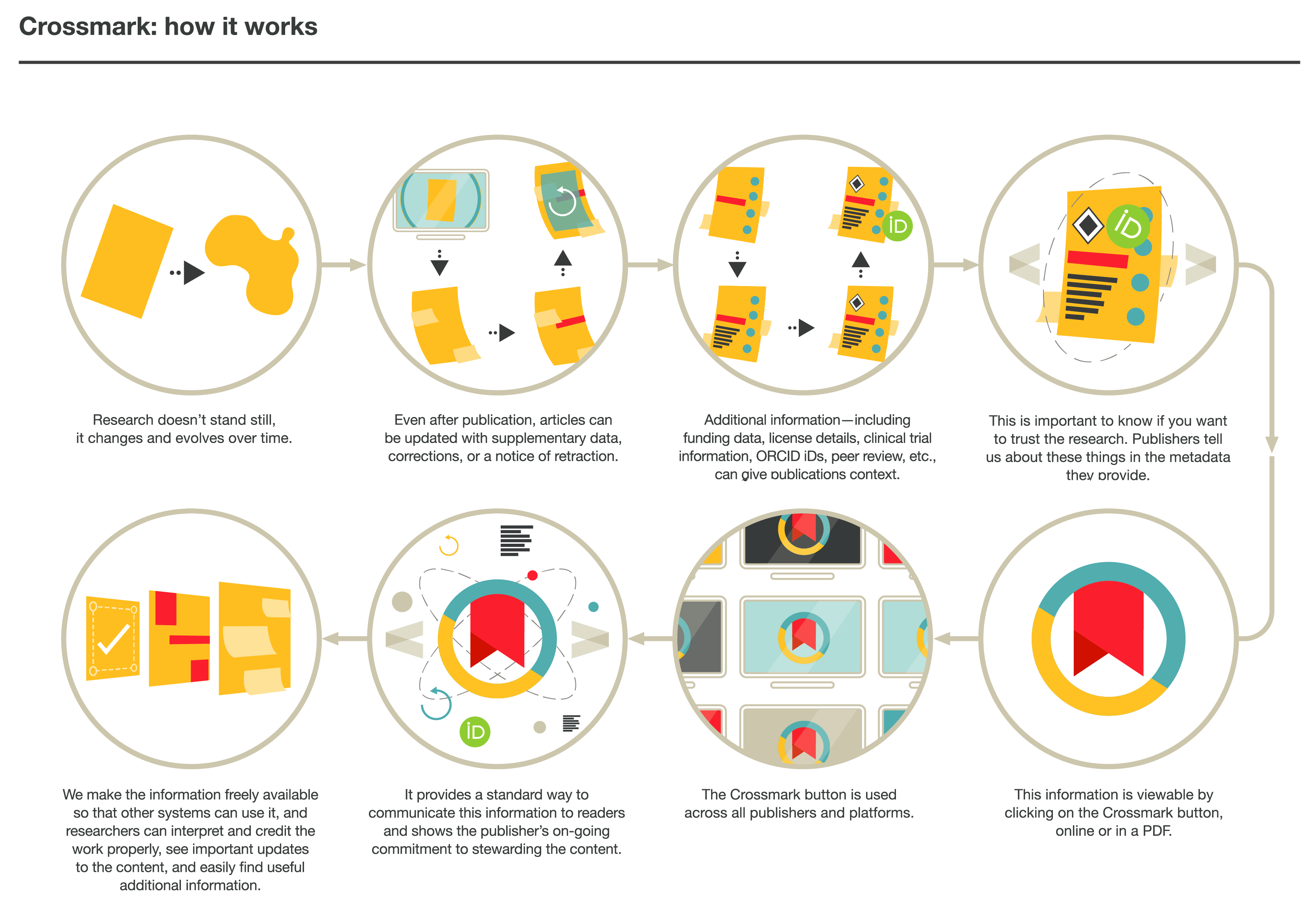
The Crossmark button gives readers quick and easy access to the current status of an item of content, including any corrections, retractions, or updates to that record.
Crossmark provides a cross-platform way for readers to quickly discover the status of a research output along with additional metadata related to the editorial process. Crucially, the Crossmark button can also be embedded in PDFs, which means that members have a way of alerting readers to changes months or even years after it’s been downloaded.
Research doesn’t stand still: even after publication, articles can be updated with supplementary data or corrections. It’s important to know if the content being cited has been updated, corrected, or retracted. Crossmark makes this information more visible to readers. With one click, you can see if content has changed, and access valuable additional metadata provided by the member, such as key publication dates (submission, revision, acceptance), plagiarism screening status, and information about licenses, handling editors, and peer review.
Crossmark lets readers know when a substantial change affecting the citation or interpretation has occurred, and that the member has updated the metadata record to reflect the new status.
Watch the introductory Crossmark animation in your language:
Members can report updates to readers and showcase additional metadata.
Researchers and librarians can easily see the changes to the content they are reading, which licenses apply to the content, see linked clinical trials, and more.
Anyone can access metadata associated with Crossmark through our REST API, providing a myriad of opportunities for integration with other systems and analysis of changes to the scholarly record.
How Crossmark works
Members place the Crossmark button close to the title of an item on their web pages and in PDFs. They commit to informing us if there is an update such as a correction or retraction, as well as optionally providing additional metadata about editorial procedures and practices.
While members who implement Crossmark provide links to update policies and commit themselves to accurately reporting updates, the presence of Crossmark itself is not a guarantee. However, it allows the community to more easily verify how members are updating their content.
If you use Crossmark, the Crossmark button must be applied to all of your new content, not just content that is updated. Selective implementation means that a reader, such as a researcher or librarian, who downloaded a PDF version before the update would have no way to know that it has been updated. We also encourage you to implement Crossmark for back-year records, although doing so is optional. At least, we encourage you to do so for back-year records that have been updated.
Obligations for Crossmark
Any member can provide update metadata and register an update policy. If you are a member who implements the Crossmark button, you must:
Maintain your content and promptly register any updates.
Include the Crossmark button on all digital formats (HTML, PDF, ePub).
Implement Crossmark using the script provided by us.
Not alter the Crossmark button in any way other than adjusting its size.
Implementing the Crossmark button involves technical changes to your website and production processes. Check that you have the necessarily expertise to implement these before you start. If not, you can start to deliver update metadata and implement the Crossmark button at a later point.
Any organisation can also implement the Crossmark button on pages where they display content. If you do so, you must follow the guidelines above, except for the first point if you are not reponsible for the content.
There are no additional fees to participate in Crossmark.
How to participate in Crossmark
There are several steps for members to fully implement Crossmark:
Devise an update policy, assign it a DOI, and register it with us.
Add the update policy and, optionally, other relevant metadata to your metadata records.
Publish corrections, retractions, and other updates for works where necessary, and register their metadata. See our guidance on registering updates.
Implement the Crossmark button online and in PDFs.
To see which Crossref members are registering Crossmark information, visit Participation Reports. These reports give a clear picture for anyone to see the metadata Crossref has including Crossmark data.